How to Use Claude with HighLevel
Businesses using HighLevel often look for ways to improve customer communication, automate repetitive tasks, and increase efficiency. As artificial intelligence continues to evolve, many agencies and business owners are now integrating Claude AI with HighLevel to create smarter workflows and more personalized customer interactions.
By combining HighLevel’s automation capabilities with Claude’s advanced conversational intelligence, businesses can automate emails, SMS campaigns, lead qualification, and customer support while maintaining a natural, human-like experience.
This guide explains how to use Claude with HighLevel, how to set up the integration, and how to maximize results.
What Is Claude?
Claude is an advanced Anthropic AI Assistant. It helps businesses create human-like text for answers, summarizing information, asking customers questions and more.
Unlike most chatbots, which offer monotonous answers, Claude is more accurate and context-aware in its conversations. Because of this, several marketers and agencies resort to its exploitation in creating content, responding to customers, nurturing leads, and automating workflows.
The reasons for this are that Claude can interpret complex commands and has proven to be a great choice for businesses aiming to improve their customer service.
What Is HighLevel?
All-in-One CRM & marketing automation for agencies and local businesses: HighLevel.
Combines multiple tools onto a single platform, such as email marketing, SMS campaigns, sales pipelines, booking calendars, workflow automation, reputation management and reporting.
Businesses can have everything in one place in place of all those subscriptions. Rather than handling numerous subscriptions, businesses can manage everything in one place inside HighLevel. Adding AI capabilities with Claude, however, can unlock even further efficiencies.
Benefits of Using Claude with HighLevel
The first step in learning to use Claude with HighLevel is to understand the advantages of integrating the two.
First, Claude acts to develop more natural communication. Email, SMS and follow-up sequences sound more like personal messages than automated ones.
Secondly, you save time. Claude produces high-quality drafts in a matter of seconds instead of having to write something from scratch or copy and paste answers from elsewhere.
Thirdly, you enhance consistency. Every customer interaction can reflect your brand voice while maintaining professionalism.
Claude also understands information on a massive scale and can process it quickly. This allows your team to save time on repetitive job tasks and dedicate more time to growth.
AI-driven automation can lead to quicker execution and improved customer engagement for businesses that adopt it.
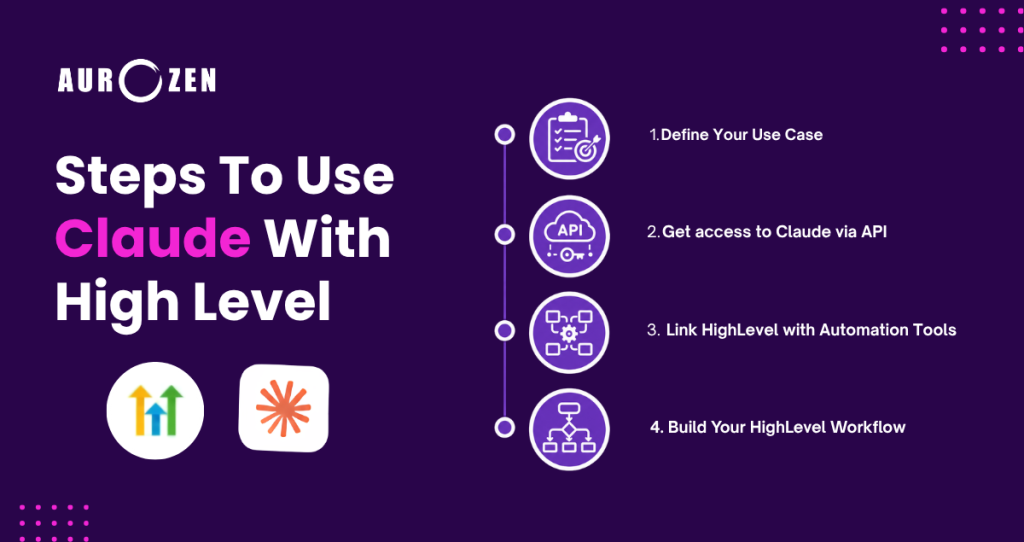
Step 1: Define Your Use Case
Before writing anything, decide exactly how you’ll utilize Claude in HighLevel.
For instance, you can let Claude
Generate email campaigns
Write SMS follow-ups.
Answer inquiries
Create appointment reminders.
Create a social media description
Summarize customer conversations.
Qualify leads automatically.
It will be a lot easier to implement if there is a clear objective.
Step 2: Get access to Claude via API
Claude works via Anthropic’s API.
To connect Claude with HighLevel, you will first need an Anthropic account and API access. After generating your API key, store it securely, as it grants access to your Claude usage and billing. Many businesses simplify this process by using middleware platforms such as Zapier or Make, or by implementing custom webhook integrations.
Step #3: Link HighLevel with Automation Tools
The simplest way to do this is through automation platforms.
Popular options include:
Zapier.
Make.
Webhook-based integrations.
Custom API connections.
With these tools, Claude can automatically send and receive data via HighLevel workflows.
A new lead that comes into your CRM, for instance, might kick off a workflow that sends lead information to Claude to generate personalised follow-up.
Consequently, your automation becomes smarter and doesn’t need you to do all the work.
Step 4: Build Your HighLevel Workflow
In the Admin Console of HighLevel, go to Automation.
Define a task that will be triggered when your goal is achieved. Set up a workflow that will start when you reach your goal.
Common triggers include:
Form submissions.
Pipeline stage changes.
New appointments.
Incoming messages.
Missed calls.
Tag assignments.
However, once you activate your trigger, you can configure the next action to send data to the integration platform you’ve selected.
This form provides Claude with the correct information at the appropriate time.

Considering the effectiveness of email marketing in nurturing prospects, it is hard to overstate how useful and effective the medium can be.
Once you’ve integrated Claude, you can use the automatic features to generate:
Welcome emails.
Promotional announcements.
Re-engagement campaigns.
Appointment confirmations.
Claude generates customer-context-specific messaging as an alternative to generic templates.
Claude will be able to create a personalized email based on a prospect’s inquiry, for example, if they ask for information regarding your services.
So, when you communicate, it feels authentic but is efficient.
In this guide, you’ll learn how to use Claude with HighLevel for SMS campaigns.
SMS Marketing has recorded the highest open rates. But it can be a challenge to handcraft tailored messages at scale.
Claude makes this process easy.
How to Use Claude with HighLevel for SMS Campaigns
Reminding and promoting, follow-up and check-in with customers are automated.
Furthermore, Claude eliminates repetitive writing, frees up your team’s time for relationship building, and keeps them more engaged in building these connections.
Relevance and timeliness to the customer increase engagement.
How to use Claude for Lead Qualification.
Qualifying leads can take a lot of time.
Fortunately, Claude can help review the requests.
Claude can classify leads using predefined criteria by analyzing the form’s submission or customer response.
This means that the AI can find:
High-intent prospects.
Information seekers.
Existing customers.
Unqualified inquiries.
Therefore, the chances are prioritized to help sales teams sell better.
This helps increase productivity and leads to quicker response times.
Best Practices for Claude integration and HighLevel integration.
If you are looking for the best experience with Claude, it is recommended to consult the best practices, but its function is not difficult to master with HighLevel.
Use simple workflows initially.
Don’t rush to automate each customer engagement. Test expansions before expanding, rather than after.
Provide detailed prompts.
Claude works best in the setting of specific instructions. Add context, tone preferences, formulating requirements, and desired results.
Regularly examine generated content.
There is a need for human oversight for even the most sophisticated AI. Periodically check outputs to ensure quality standards.
Protect sensitive information.
Don’t share extraneous customer information. Abide by privacy regulations and compliance within the organization.
Monitor performance.
Monitor open rates, reply rates, appointment bookings and conversions. Leverage these to continually improve your workflows.
Common Errors to Prevent
Most companies hasten their implementation and end up with unnecessary issues.
One error in question framing was in the ambiguity of the prompts.
Ask Claude to write an email, and results can be wildly different. Rather, identify the audience, purpose, attitude, and call to action.
Another error is over-automation.
Although AI can streamline processes, it is important for customers to make their own connections. Enhance relationships with Claude, but don’t replace them.
Impacts from not testing workflows can also exist.
Test any internal tests before going public with anything.
Last but not least, failing to keep up with updates could diminish their long-term effectiveness. Review and revisit prompts and processes regularly for continued success.
How We Use Claude with HighLevel at Aurozen Marketing
At Aurozen Marketing, we use Claude and HighLevel together to automate lead follow-ups, improve email responses, and streamline customer communication workflows. While AI handles repetitive communication tasks, our team reviews and refines messaging to ensure accuracy and maintain each client’s brand voice.
This combination allows us to respond faster, save time, and deliver a more personalized customer experience without sacrificing quality.
Claude vs Traditional HighLevel Automation
Traditional HighLevel workflows rely on predefined templates and decision trees. In contrast, Claude adds conversational intelligence, enabling more personalized and context-aware communication.
Businesses that combine Claude with HighLevel can automate customer interactions while maintaining a natural and engaging experience.
Benefits Businesses Can Expect
HighLevel users who know how to use Claude find improvements and measurable changes in their organization.
Businesses save hours that would otherwise be spent handling repetitive communications.
As a result, prospects receive faster responses and quicker follow-ups.
In addition, customers benefit from more personalized experiences tailored to their needs.
This approach also ensures greater consistency across multiple communication channels.
Ultimately, it streamlines operations and improves overall efficiency.
Most importantly, they free their teams to concentrate on their strategic growth initiatives.
These efficiencies can be even more significant for agencies that serve several clients.
Can Claude be used instead of traditional automation?
Traditional HighLevel workflows rely heavily on predefined templates and automation rules. Although these workflows remain highly effective, they may lack the flexibility required for personalized customer communication.
Claude introduces adaptive AI capabilities that generate responses based on context, customer intent, and business objectives. Consequently, businesses can deliver more relevant and engaging interactions while preserving automation efficiency.
Rather than replacing HighLevel automation, Claude enhances it by making customer communication more intelligent and human-like.
Who is the ideal customer for Claude’s use with HighLevel?
The advantages of integration extend to a variety of professionals.
A marketing agency can provide communication reduction; it may well focus on marketing communications systems with the client.
You can set up automations for businesses like your own.
Sales teams can qualify inquiries more quickly.
Coaches and consultants have an opportunity to enhance the process of nurturing their appointments.
Service providers can promote consistent customer engagement.
AI can deliver professional output for even small teams with minimal resources, minimizing overhead.
Getting Started Today
The great news is that you don’t need to be at an advanced level of technical skill to get started.
Begin with one workflow to keep things manageable.
Select one task that you do over and over that takes time.
Connect to an automation platform to integrate Claude.
Test your prompts.
Measure the outcomes.
Then expand gradually.
A small change today can make a big difference over the long term.
This is a great time to start using AI in their business processes if they’ve been putting it off.
Do not miss out on the competitive edge that is offered by smarter automation.
Conclusion
By tapping into HighLevel’s ability to streamline customer relationship management (CRM) workflows, Claude enables companies to gather advanced conversational AI with robust CRM automation. Claude’s integration with HighLevel enables businesses to merge advanced conversational AI with powerful CRM automation. This integration can enhance various aspects of customer engagement, lead qualification, 2-way communication, and email marketing campaigns, among others, thereby improving both efficiency and the customer experience.
By embracing AI automation and human oversight, companies can more effectively balance productivity and efficiency while maintaining high-quality customer engagement, ultimately fostering sustainable growth and resilience. Test individual workflows, then scale up as you grow more confident in your automation strategy.